Know what to say next without stopping the take.
Vurbly is an AI teleprompter that needs no script. It listens while you record and writes down every word. When you lose your place, it shows your next point, the question a viewer is about to ask, or the number you meant to look up, with its source.
Okay, this one is the big experiment.
I wanted to see if I could stop editing my own videos.
Open with the 14-hour number, then the 3.
Promise you'll play a chopped cut later, so viewers stay for it.
A replay of the Record screen. In the app, Claude writes these cues from your transcript while you talk.
For YouTube videos, Shorts and Reels, podcast interviews, and calls on Zoom or Google Meet.
- YouTube
- TikTok
- Spotify
- Apple Podcasts
- Google Meet
Open it beside your camera
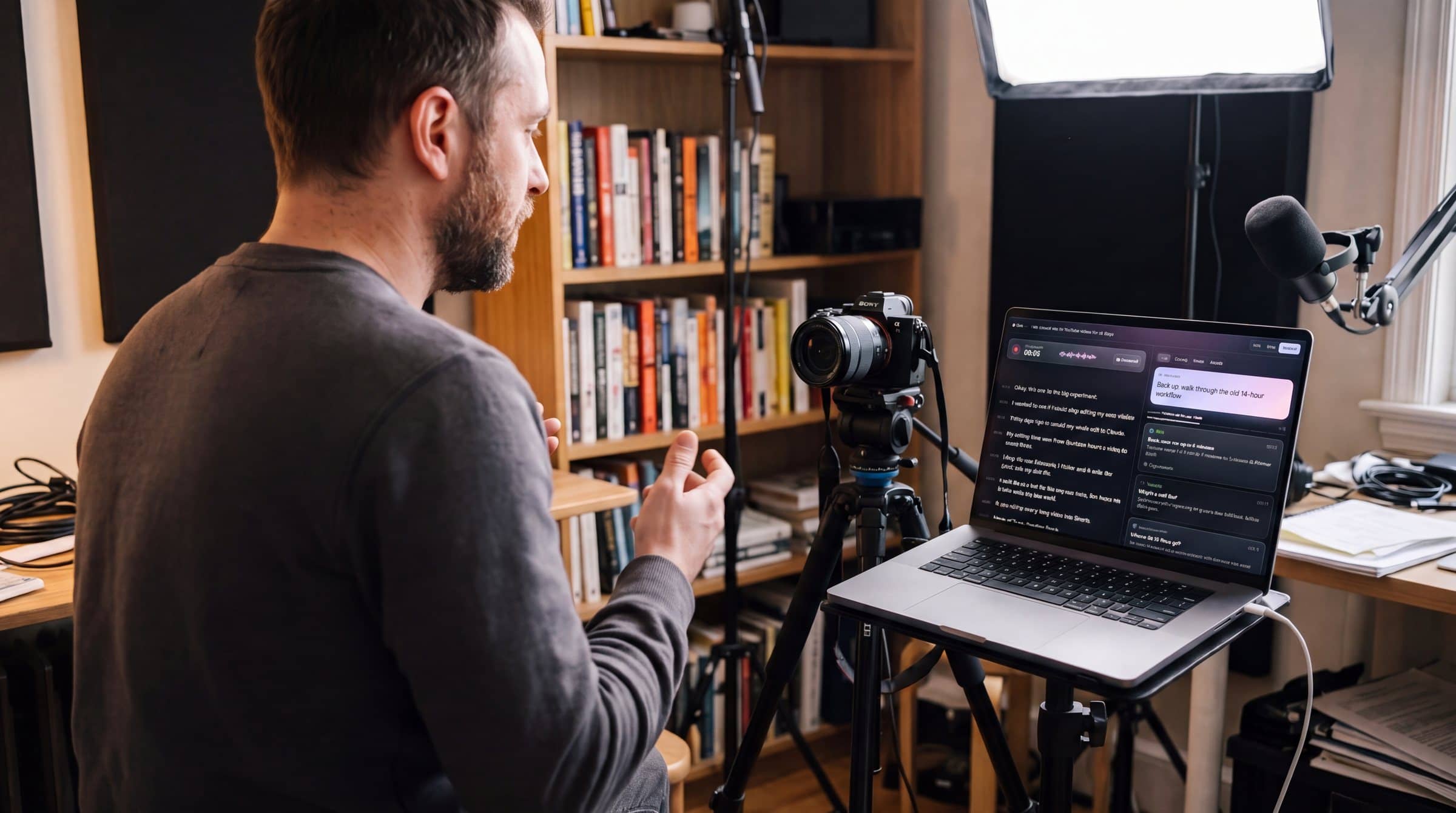
What shows up while you talk
- Say nextBack up: walk through the old 14-hour workflow.Your next point, written as one line you can say. It updates as the take moves.
- Viewer questionWait, what does “agentic” mean?A term you used without explaining, or the question viewers would type in the comments. These come first.
- StatShorts can run up to 3 minutes.A number or recent event looked up during the take. Each card links to the page it came from.
- Tell a storyTell the one about the plumber’s generic ad.A story from your plan or notes, at the moment it fits what you’re saying.
- Show assetCut to the before-and-after clip.B-roll, screenshots and files you added to the plan, when what you’re saying matches one.
- CallbackTie this back to the 14 hours from the intro.Something you said earlier that pays off now.
- Move onYou’ve covered the setup. Show the fix.A nudge to the next beat of your outline when a point runs long.
Talk the idea through before you hit record
What’s the video? Say it however it comes out, typed or out loud. I’ll ask questions and build the plan as we go.
Talk it through…
Or skip the plan and press record
Cues follow your outline beat by beat, catch the terms you forgot to explain, and point to your B-roll when it fits.How this differs from a teleprompter
You used it twice. One sentence on what it means before you go on.
You’re describing the raw footage folder. You added a screenshot of it to the plan.
Hear both sides of a call
Connect computer audio and Vurbly transcribes you and the other person on separate lines. Cues switch to what you should ask them, and anything they said earlier that matters now.
- 1Start a Meeting or Podcast take.
- 2Press Connect and pick the Meet tab, or your screen with system audio for the Zoom app.
- 3Hit record. Lines come in labeled You and Them.
More on meetings on Zoom and Google Meet and remote podcast interviews.
Built to glance at between sentences
- 01
Type you can read from your chair
The transcript and cues are large by default, with a size control for when the screen sits farther back. Space pauses and resumes.
- 02
An I’m stuck button
If you blank, press it and a cue comes right away instead of waiting its turn.
- 03
One new cue at a time
Cards queue up, about one every 35 seconds, so the screen never fills up mid-sentence.
- 04
Cards clear themselves
Once you cover a point, its card marks itself covered. Cards you skip expire after a couple of minutes.
- 05
A source on every fact
Stats and events come from a web search during the take, and each card links to the page it came from.
- 06
Every take saved
Finish take keeps the transcript and the cues together, so you can find the version that worked.
Questions
Ask anything else by replying to the early access email.
Is Vurbly a teleprompter?
Sort of, without the script. A teleprompter scrolls words you wrote ahead of time. Vurbly listens while you talk, writes down what you say, and shows one short cue at a time: your next point, a question a viewer would ask, or a fact with its source.
Does Vurbly record my video?
No. Keep recording with your camera, OBS or whatever you use now. Vurbly runs in a browser tab beside it and saves the transcript, your notes and the cues for each take.
Will it talk to me while I record?
No. Cues only show up on screen, in large type you can read from your chair, so nothing ends up in your audio. Press Space to pause and resume between takes.
Which browsers does it work in?
Chrome or Safari on a computer for solo recording. Calls need Chrome. A Google Meet tab works in any recent Chrome. To hear the Zoom app on a Mac you share your screen with system audio, which needs Chrome 141 or newer and macOS 14.2 or newer.
Does a bot join my Zoom or Google Meet call?
No. Vurbly listens to the call audio you share from Chrome: the Meet tab, or your screen with system audio for the Zoom app. Nothing joins the call and nothing shows up in the participant list.
Where does my audio go?
Vurbly doesn’t save audio. For solo takes, your browser’s built-in speech recognition writes the transcript. On calls, audio goes to Deepgram to be transcribed. The transcript goes to Claude, made by Anthropic, to write the cues.
Can it use my notes or script?
Yes. Add notes or an outline to the plan, or drop in PDFs, text files and images. Vurbly cues points and stories from them during the take. It doesn’t scroll a script line by line.
Where do the facts come from?
A web search that runs while you talk. A fact card only shows up with a link to a page from that search, so you can check it before you say it on camera.
Record your next video with a producer beside you.
Vurbly is in early access. Leave your email and we’ll send you a way in when your spot opens.